
Update
Overview
This release introduces Quick Lease Document Management, designed to help Rental Managers update and manage lease documents directly from the lease list without having to navigate through multiple tenant records.
Past State
Previously, managers had to open each tenant or owner group record individually to upload, update, or download lease documents. This process required navigating through multiple screens and repeating the same steps for every tenant, making lease management time-consuming and inefficient.
What's New
With this release, managers can now access lease document management directly from the lease list through a new Documents icon displayed beside each user.
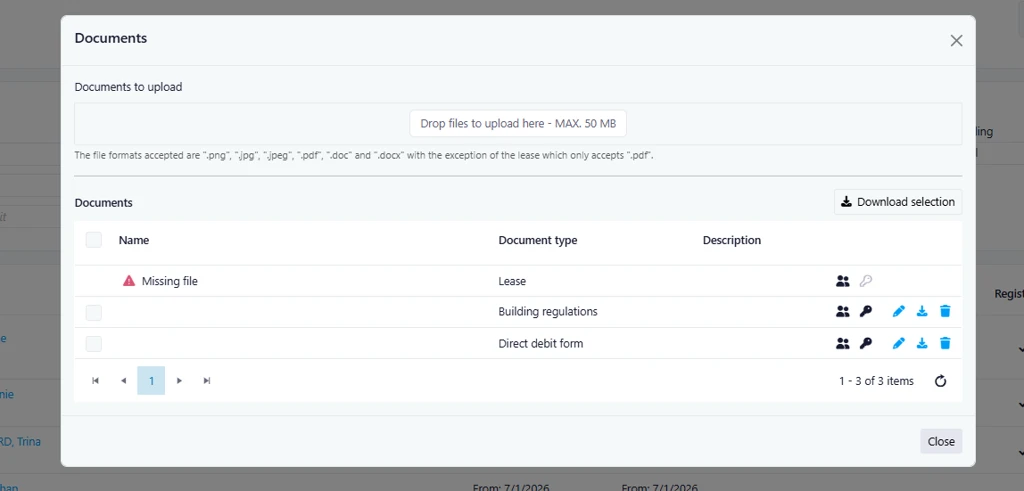
The new feature provides a convenient popup window that allows users to:
- Upload lease-related documents directly from the lease list.
- Download existing documents.
- Download multiple documents at once.
- View documents according to their assigned permissions and access rights.
- Use the same document management logic and validation already available within tenant and owner group records.
How It Works
- Navigate to the Lease Management area.
- Locate the tenant or user whose lease documents need to be updated.
- Click the Documents icon displayed beside the user's name.
- A popup window will open showing the available lease documents.
- Upload new files, download individual documents, or download multiple documents simultaneously.
- Save your changes to automatically update the associated lease and document records.
Where to Find It
You can find this feature in: Rental Management > Leases
To access it:
- Open the Leases module.
- Locate the desired tenant or lease record.
- Click the Documents icon beside the user name.
Benefits
- Saves time by eliminating the need to open each tenant record individually.
- Simplifies document management with direct access from the lease list.
- Improves efficiency through multi-file download capabilities.
- Maintains existing document security and permission controls.
- Provides a more streamlined workflow for Rental Managers.
Important Notes
- Document permissions and visibility continue to follow the existing security rules.
- Uploaded documents are synchronized with the corresponding tenant and owner group records.
- Multi-file download functionality is now available directly from the document management popup.