
New Feature
Overview
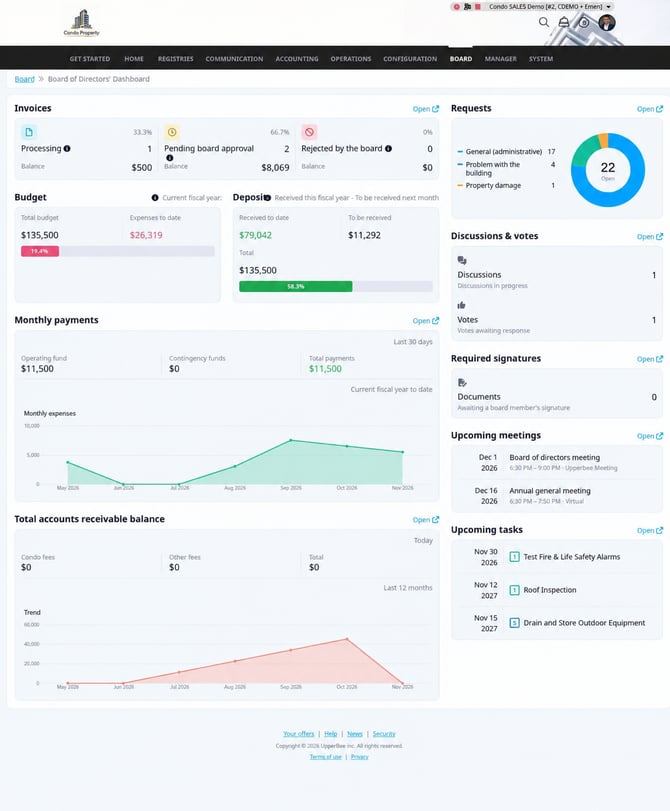
The Board Member Dashboard brings key financial indicators, active requests, and upcoming activities together in one view for the selected condominium. Authorized board members and management employees with the required permissions can review these items and open their source pages for more detail.
Previous Experience
Previously, board members and management teams had to move between different areas of UpperBee to review financial information and follow board activity. This made it harder to see pending items and upcoming events at a glance.
What’s New
- Review invoices, budget information, deposits, monthly payments, and total receivables in one place.
- Follow requests, discussions and votes, required signatures, upcoming meetings, and tasks.
- Open available links to go directly to the related source pages for more detail.
- Use information links beside budget and deposit amounts to access the related details.
How It Works
- Open the Board Member Dashboard and select a condominium you are authorized to access.
- Review the financial indicators and activity sections for the selected condominium.
- Select an available link to open the source page and view more details.
Where to Find It
Board → Dashboard
To Access It
- Sign in to UpperBee with an authorized board member account or a management employee account with the required permissions.
- Open the Board Member Dashboard from the navigation menu.
- Select the condominium you want to review.
Benefits
- One clear overview: Review key financial information and board activity from one place.
- Quicker follow-up: Find requests and activities that need attention more easily.
- Direct access to details: Open source pages from dashboard links.
Important Notes
- Access is limited to authorized board members and management employees with the required permissions. Management employees do not need to be board members.
- The dashboard is available for condominiums, not rental properties, and displays information for the selected condominium.
- Dashboard data may take up to 30 seconds to refresh.