
Update
Overview
This release introduces approval permission validation for invoice assignments, designed to ensure that invoices can only be assigned to users who have the necessary access rights to approve and process them.
Past State
Previously, invoices could be assigned to any employee regardless of their approval permissions. This occasionally resulted in invoices being assigned to users who could not access or approve them, causing approval bottlenecks, delayed payments, supplier follow-ups, and, in some cases, late payment penalties.
Additionally, when an employee was archived, invoices awaiting approval could remain assigned to that employee without a streamlined reassignment process.
What's New
With this release:
- Invoices can now only be assigned to users who have the required permissions to approve invoices.
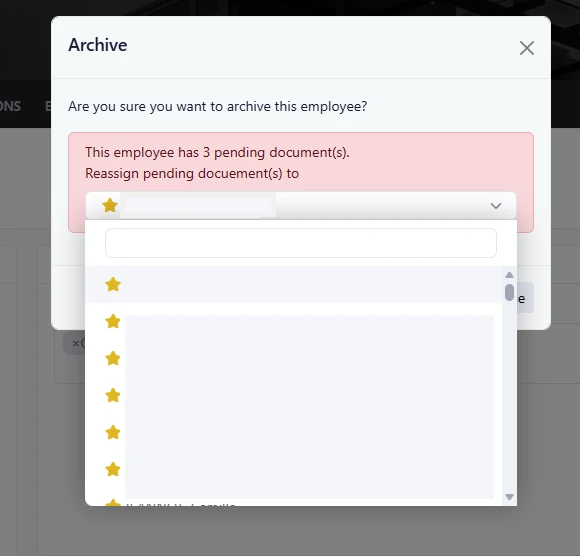
- When an employee is archived, the system prompts administrators to reassign all pending invoices.
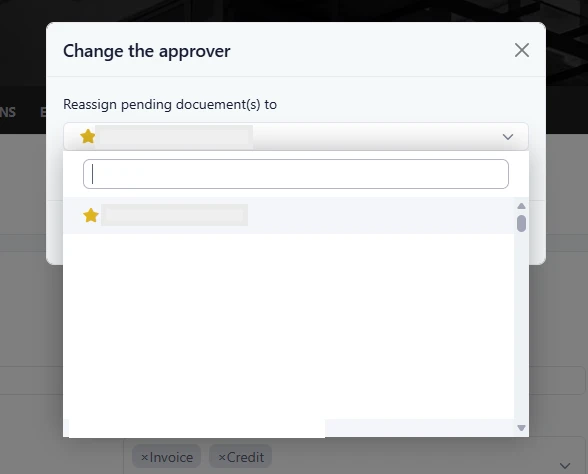
- Pending invoices can be reassigned in bulk to either:
- A specific user
- A user role
These enhancements help ensure that invoices remain within the approval workflow and are not left unattended.
How It Works
Invoice Assignment Validation
When assigning an invoice for approval:
- The system verifies whether the selected user has invoice approval permissions.
- If the user does not have the required access, the assignment cannot be completed.
- Only eligible approvers are allowed to receive invoices for approval.
Employee Archiving Process
When an employee is archived:
- The system identifies any invoices currently awaiting action from that employee.
- A reassignment prompt is displayed.
- Administrators can choose to reassign all pending invoices to:
- Another employee, or
- A role responsible for invoice approvals.
- The reassignment is completed in bulk, ensuring no invoices remain assigned to an inactive employee.
Where to Find It
You can find this feature in: Accounts Payable > Invoice Approval Workflow
To access it:
- Open an invoice that requires approval.
- Select an approver or assign the invoice.
- The system will validate the approver's permissions before completing the assignment.
For invoice reassignment:
- Navigate to Administration > Employees.
- Archive an employee.
- Select the user or role that should receive all pending invoices.
Benefits
- Prevents invoices from being assigned to users who cannot approve them.
- Reduces approval delays and improves payment processing efficiency.
- Ensures pending invoices are automatically addressed when employees leave or become inactive.
Important Notes
- Only users with invoice approval permissions can receive invoices for approval.
- The reassignment prompt appears only when the archived employee has pending invoices.
- Bulk reassignment helps maintain continuity in the approval process and prevents invoices from being overlooked.