
Update
Overview
This release introduces Past Reservation Creation for Admins and Property Managers, designed to provide greater flexibility when managing reservation payments and attendance records.
Past State
Previously, users could not create reservations for past dates when a reservation required payment. This created challenges when attendees participated in paid reservation events but staff forgot to process or create the reservation at the time of the event. This situation occurred frequently, particularly during weekends, resulting in missed charges and additional administrative work.
What's New
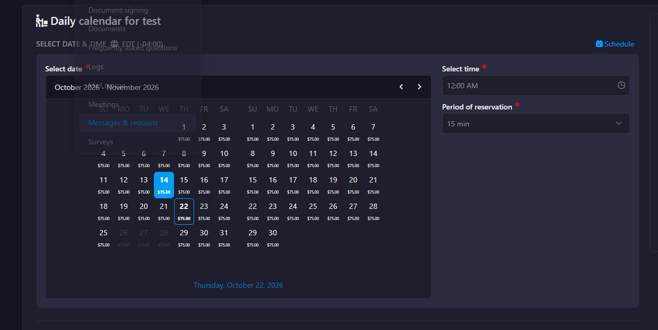
With this release, Company Admins and Property Managers can now create reservations in the past, even when the reservation requires payment.
How It Works
When creating a reservation, users with the Company Admin or Property Manager role can select a past date and successfully create the reservation, regardless of whether payment is required for the reservation type.
This permission is limited to authorized roles and allows staff to accurately record past paid reservations that were not entered on time.
Where to Find It
You can find this feature in: Communications > Messages and Requests > Reservations
To access it:
- Navigate to Communications > Messages and Requests > Reservations.
- Select New Reservation Request.
- Choose a past date and complete the reservation details.
Benefits
- Reduces missed charges for paid reservation events.
- Provides greater flexibility for administrative staff.
- Improves reservation and financial record accuracy.
Important Notes
- Only users with the Company Admin or Property Manager role can create reservations in the past.
- Standard reservation rules and permissions continue to apply unless specifically overridden by this enhancement.