
Update
Overview
This release introduces configurable request generation lead time for recurring maintenance tasks in the Advanced Maintenance Board, allowing users to specify how many days before a scheduled occurrence a maintenance request should be automatically created.
Past State
Previously, recurring tasks created in the Advanced Maintenance Board automatically generated a request on the scheduled date. Users could not configure how far in advance requests should be created, unlike Basic Maintenance Logs where this option was already available.
What's New
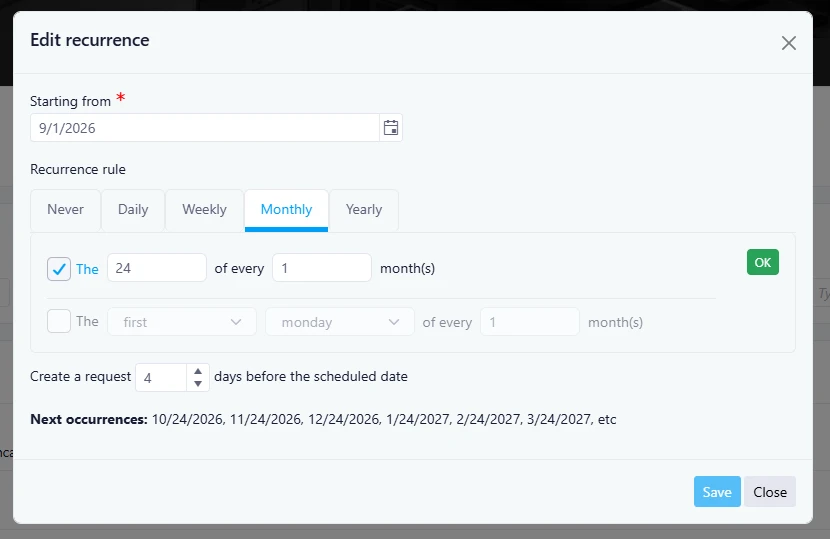
With this release, a new "Create a request X days before the scheduled date" option has been added to recurring tasks in the Advanced Maintenance Board.
Users can now define the number of days before a scheduled occurrence that a request should be automatically generated. By default, the value is set to 0 days, meaning the request is created on the scheduled date unless another value is specified.
How It Works
When configuring a recurring task, users can enter the number of days before the scheduled occurrence that a request should be created.
The request generation logic follows these rules:
- Requests are generated when the scheduler reaches the configured lead time before the next eligible occurrence.
- Once a request is generated, the system waits until a new eligible occurrence falls within the configured lead time window before creating another request.
- Existing requests do not need to be closed for future requests to be generated.
- The call for bids generation process remains unchanged.
Example
Assumptions:
- September 1 is the first uncovered occurrence.
- Lead time is set to 5 days.
- Each generated request is saved before the next scheduler’s execution.
|
Scheduler Date |
Scenario |
Result |
|---|---|---|
|
August 27 |
5 days before September 1 |
Request created |
|
August 28 |
4 days before September 1 |
No new request |
|
September 1 |
Scheduled occurrence date |
No new request |
|
September 26 |
5 days before October 1 |
Next request created |
Where to Find It
You can find this feature in: Advanced Maintenance Board > Tasks > Recurrence Settings
To access it:
- Open the Advanced Maintenance Board.
- Create or edit a recurring task.
- Configure the recurrence rule and enter the desired value in Create a request X days before the scheduled date.
Benefits
- Provides greater control over maintenance planning.
- Allows maintenance teams to prepare and assign work ahead of scheduled dates.
- Aligns recurring task behavior with the flexibility already available in Basic Maintenance Logs.
Important Notes
- The default value is 0 days.
- Existing recurring tasks without a configured value will continue generating requests on the scheduled date.
- The Call for Bids generation mechanism is not impacted by this change.
- Previously generated requests can remain open without preventing future request generation.