
New feature
Overview
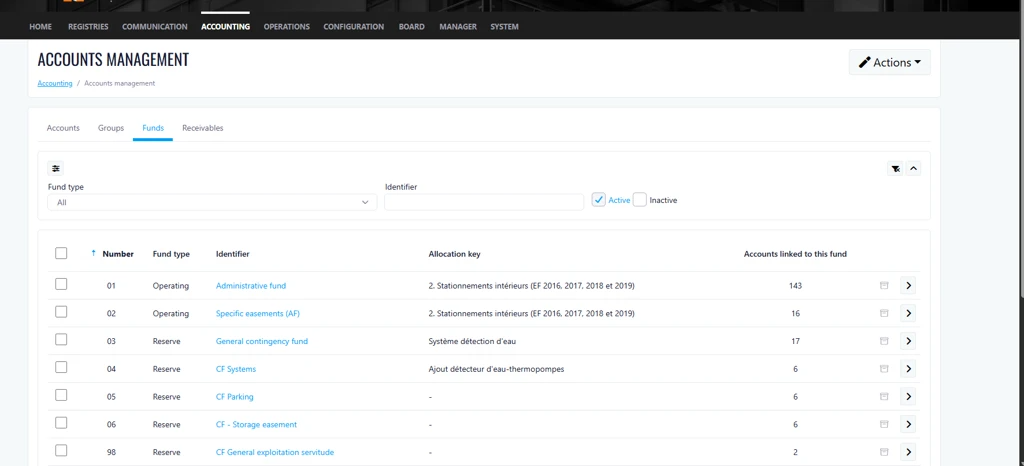
This release introduces a new Allocation Key column on the Funds page. The enhancement provides users with immediate visibility into each fund's allocation key, eliminating the need to open individual fund records for verification. This streamlines fund management activities and improves overall efficiency.
How It Works
Users can now view the Allocation Key directly from the Funds list, allowing for quicker validation and review of fund configurations without navigating into each fund's details.
Where to Find It
Accounting > Account Management > Funds
To Access It
- Navigate to the Accounting menu and select Account Management.
- Open the Funds tab.
- Locate the new Allocation Key column within the funds grid.
Previous Experience
Previously, the allocation key information was not displayed in the Funds list. Users were required to select Edit for each individual fund to view and validate the allocation key.
What's New
- Added a new Allocation Key column to the Funds page.
- Allocation keys are now visible directly from the funds list.
- Reduced the need to access individual fund records for validation purposes.
Benefits
- Improved Efficiency
- Faster Validation Process
- Enhanced Accuracy and Visibility
Important Notes:
For rental properties, the new column displaying the allocation key is now available in the “Projects” tab.