New Feature
Overview
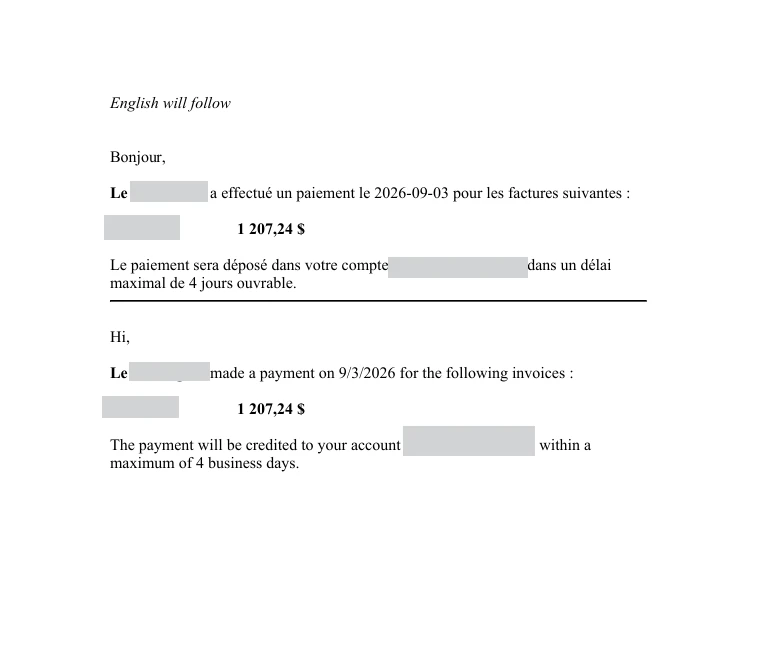
This release introduces a new Download Payment Notice feature, allowing users to download a PDF copy of a payment notice directly from the payment details page. The PDF contains the same information currently included in the payment notification email sent to suppliers.
Previous Experience
Previously, users could only resend a payment notice via email using the Resend button available in the payment details page. There was no option to download or retain a copy of the payment notice.
What's New
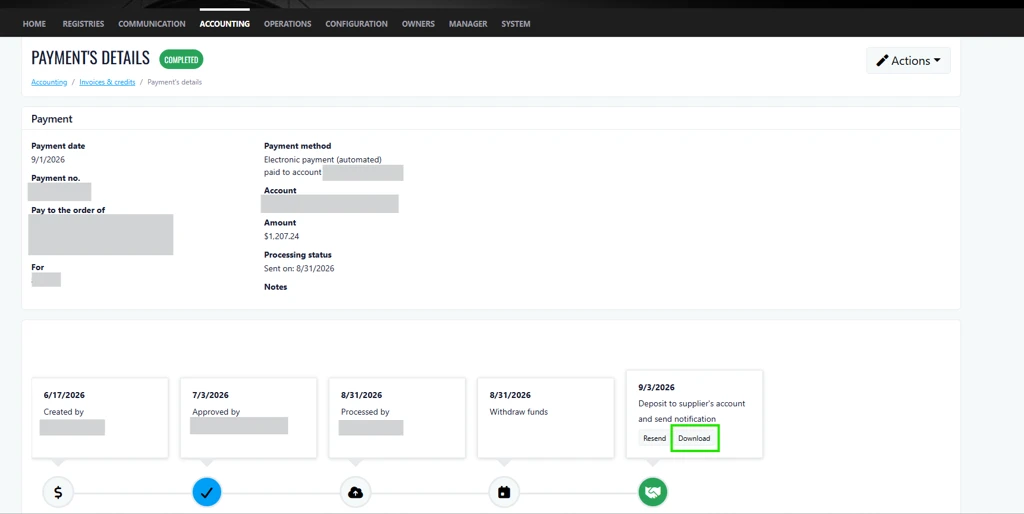
A new Download button has been added alongside the existing Resend button. This enhancement provides users with greater flexibility by allowing them to either resend the payment notice via email or download a PDF version for their records and communication needs.
How It Works
From the payment details page, simply click the Download button. A PDF file will be generated containing the same information displayed in the supplier payment notification email, making it easy to save, print, or share as required.
Where to Find It
Navigation:
Accounting > Invoices & Credit Notes > Payment Details
To access the feature:
- From the main menu, navigate to Accounting and select Invoices & Credit Notes.
- In the Invoices tab, select an invoice from the list and click Details.
- In the Payments section, click the Payment Number (blue hyperlink).
- Locate the Deposit to Supplier's Account and Send Notification section.
- Click the new Download button to generate the payment notice PDF.
Benefits
- Improved record keeping: Download and store payment notices for audit purposes, supplier inquiries, and internal documentation.
- Enhanced flexibility: Choose between emailing the notice directly to the supplier or downloading a PDF copy for alternative distribution methods.
- Faster access to payment information: Instantly retrieve and share payment details without needing to resend or search through email communications.