
Update
Overview
This release introduces a comprehensive redesign of the Application Header and Navigation Experience, designed to modernize the interface, improve navigation consistency, optimize screen space usage, and deliver a better experience across desktop and mobile devices.
Past State
Previously, the application used multiple implementations of page headers across Razor and React pages. Page titles were displayed separately from breadcrumb navigation, resulting in duplicated information and inconsistent layouts. Action buttons occupied more space, breadcrumb behavior varied between implementations, and several React pages did not support the same quick access functionality available in Razor pages. Mobile navigation also lacked consistency across different parts of the application.
What's New
With this release, the application header has been redesigned and standardized across the platform.
Key improvements include:
- Removal of the large page title from the header.
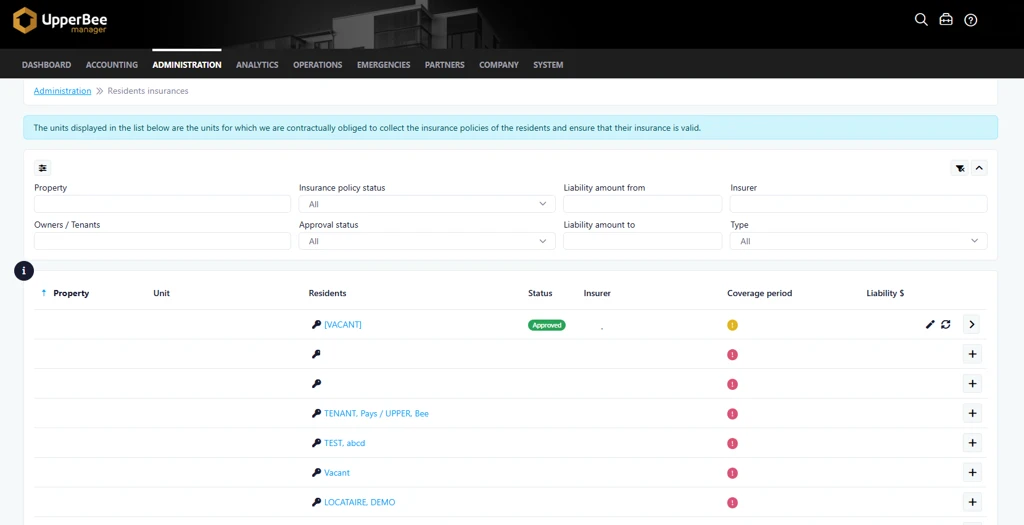
- Integration of page titles directly into the breadcrumb navigation.
- Redesigned breadcrumb styling with chevron separators for improved readability.
- Breadcrumb and action buttons displayed together on a single row when applicable.
- Reduced button sizes to create a cleaner and more compact layout.
- Updated action menu icon from a magic wand to a pencil icon.
- Improved title and breadcrumb presentation with support for additional configurable content adjacent to the page title.
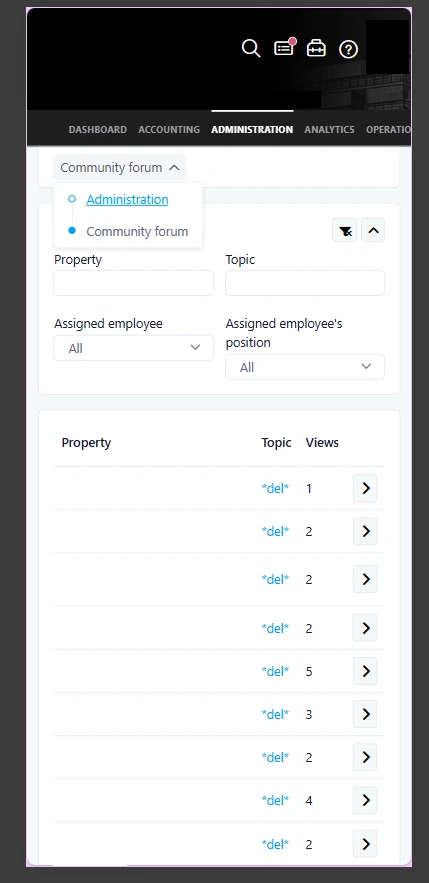
- New responsive mobile header experience based on updated design specifications.
- Consistent header implementation across Razor and React pages.
- Introduction of the Quick Access functionality on React pages to align with the existing Razor experience.
- Improved navigation behavior for long breadcrumb paths through automatic truncation and expandable navigation menus.
- Standardization of header rendering across the application, reducing maintenance complexity and improving future scalability.
How It Works
The page header now uses a unified layout throughout the application.
Instead of displaying a separate page title and breadcrumb, the page title is now incorporated directly into the breadcrumb path. Action buttons appear alongside the breadcrumb when available, creating a more streamlined and efficient layout.
When breadcrumb paths become lengthy, intermediate navigation items may be collapsed into an expandable menu, making navigation easier while preserving screen space.
On mobile devices, the header automatically adapts to smaller screens. Actions, tools, and other contextual options remain accessible through the redesigned mobile navigation experience.
Additionally, React pages now support the same Quick Access behavior available in Razor pages. As users scroll beyond the page header, a sticky Quick Access button becomes available, providing convenient access to actions, tools, settings, shortcuts, and support resources.
Where to Find It
You can find this enhancement throughout the application on pages that use the standard page header and navigation components.
To access it:
- Navigate to any module within the application.
- Open a page containing breadcrumb navigation and page actions.
- Observe the redesigned header, updated breadcrumb navigation, and responsive mobile experience.
Benefits
- More modern and visually consistent user interface.
- Better use of available screen space on desktop and mobile devices.
- Faster access to navigation, actions, tools, and support resources.
Important Notes
- This update affects pages across the application that use the standard page header.
- Mobile layouts have been redesigned to provide a more consistent experience across devices.
- Navigation functionality remains unchanged; only the presentation and accessibility of navigation elements have been improved.
- Breadcrumb navigation may automatically collapse longer paths to improve readability and responsiveness.