Update
Overview
This release introduces a new search capability within Template Management, enabling users to quickly locate information and navigate more efficiently. In addition, significant performance improvements have been implemented to reduce page load times and enhance the overall user experience.
Previous Experience
Previously, users did not have the ability to search within Template Management, making it more time-consuming to find specific items. In addition, page load times could be slow, particularly when accessing large volumes of data.
What's New
With this release:
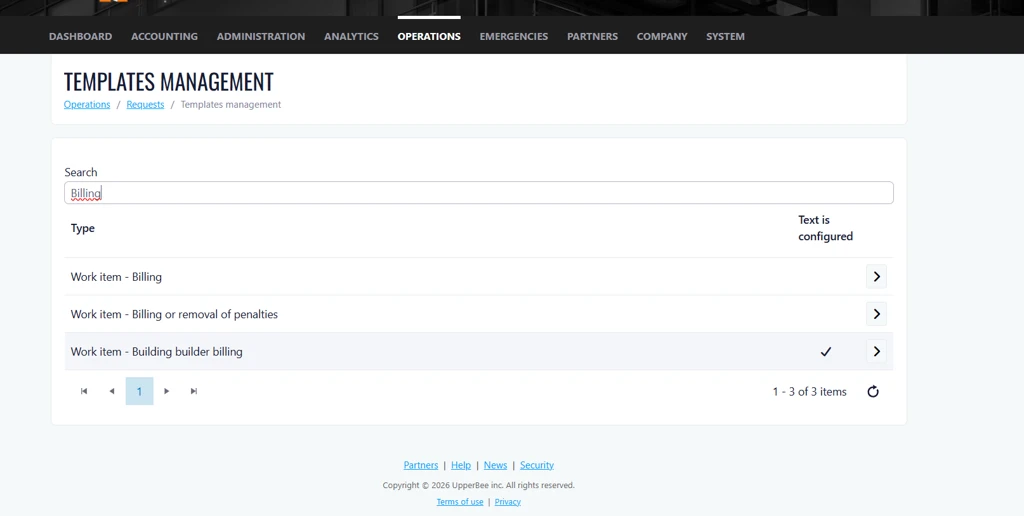
- A new search bar has been added to help users quickly find templates and related information.
- Page loading performance has been optimized, resulting in significantly faster load times.
How It Works
To search for a template, simply enter a keyword or phrase in the search bar. Matching results will be displayed automatically, helping you find the information you need faster.
Performance improvements are applied automatically, providing faster page loading without any additional configuration.
Where to Find It
Navigation Path:
Operations > Requests > Template Management
To access the feature:
- Log in to your company account.
- Navigate to Operations.
- Select Requests.
- From the Actions menu, choose Configure Work Item Templates.
- Use the new search bar to quickly locate templates and enjoy improved page performance.
Benefits
- Faster Access to Information
Quickly locate templates using the new search functionality, reducing the time spent manually browsing through lists. - Improved Productivity
Users can complete tasks more efficiently with quicker navigation and reduced waiting time when accessing pages. - Enhanced User Experience
Faster page performance and intuitive search capabilities create a smoother, more responsive application experience.