
Update
Overview
This release introduces Enhanced Request Closure Management, designed to improve communication around closed Requests and ensure Requests are properly finalized after a defined period.
Past State
Previously, when a Request was closed, users could continue replying to the ticket indefinitely, either through the application or by email. Replies could reopen the Request regardless of how long it had been closed. Additionally, automatically closed Requests did not notify all participants that the Request had been closed.
What’s New
With this release:
- Users and request participants receive an email notification when a Request is automatically closed by the system.
- Closed Requests remain editable and can be reopened for 14 days after closure.
- After 14 days, closed Requests become permanently closed and read-only.
- Permanently closed Requests can no longer be reopened, updated, or replied to.
- Email replies to permanently closed Requests no longer reopen or update the Request.
- Users attempting to reply to a permanently closed Request by email receive an automated notification directing them to create a new Request.
- The Request closure popup has been updated to clearly communicate the 14-day reopening period.
How It Works
Automatic Closure Notifications
When the system automatically closes a Request, an email notification is sent to all participants associated with the Request. The notification informs them that the Request has been closed and advises them to create a new Request if they wish to continue the discussion.
14-Day Reopening Period
After a Request is closed, users can continue to:
- Reopen the Request
- Add replies
- Update information
for a period of 14 days.
Permanent Closure
Once a Request has been closed for more than 14 days:
- The Request becomes read-only.
- Users can still view the Request and its complete history.
- Users can no longer:
- Add replies
- Modify information
- Reopen the Request
This behavior applies to Requests closed either manually by a user or automatically by the system.
Email Replies After Permanent Closure
If a user replies by email to a Request that has been closed for more than 14 days:
- The Request remains closed.
- The email reply is not added to the Request.
- An automated email informs the user that the Request can no longer be updated.
- The notification includes a link directing the user to create a new Request.
Updated Closure Popup
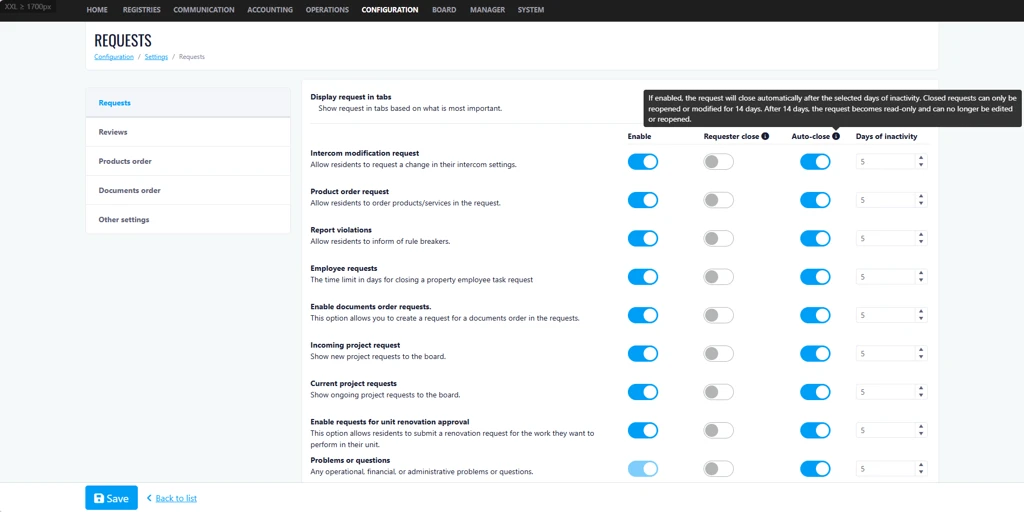
The Request closure confirmation popup now displays a message indicating that closed Requests can only be modified or reopened within 14 days. After that period, they become read-only and can no longer be edited or reopened.
Where to Find It
You can find this feature in: Requests Module
To access it:
- Open a Request.
- Close the Request or review an existing closed Request.
- View the updated closure messaging and closure behavior.
Benefits
- Improves transparency by notifying participants when Requests are automatically closed.
- Prevents outdated Requests from being reopened months after closure.
- Encourages better Request tracking by directing users to create a new Request when a new issue arises.
Important Notes
- Closed Requests remain fully accessible for viewing after permanent closure.
- The 14-day rule applies to both manually closed and automatically closed Requests.
- Email replies to permanently closed Requests will not update the original Request.